.svg)
About VEOIBD
VEOIBD is an international effort to share data to study a rare early childhood disorder known as Very Early Onset Inflammatory Bowel Disease. The program aims to “build a comprehensive atlas of intestinal epithelial, stromal, and immune cells from both monogenic and polygenic VEOIBD patients (0<6 years of age) at the single cell level” and identify the causative generic variants. Sage Bionetworks will function as a Data Coordination Center (DCC) to support sharing of data among VEOIBD investigators and the scientific research community. We will work with consortium members and data management teams across four countries: Canada, Germany, UK, and US, including three core patient recruitment sites and twelve data generation/processing/analysis sites.
Sage Role
Sage Bionetworks is funded as the Data Coordination Center (DCC) to support the management, governance, and distribution of data generated by the VEOIBD members. Data is shared among funded VEOIBD members in Synapse. Synapse is a collaborative research platform that helps you and your team share, organize, and discuss your scientific research.
The VEOIBD Private Data Portal has been configured to support the planned VEOIBD structure. For more details regarding portal access, data standards, and data upload and download please navigate to the portal’s Wiki docs at https://www.synapse.org/Synapse:syn29377188/wiki/.
Data Curator App
The data ingress process uses the Data Curator App (DCA), which is a web-based metadata upload application. It allows you as a data contributor to easily annotate, validate and submit your metadata. You can use the app to generate an empty metadata template, or to update existing metadata.
Sage Bionetworks hosts DCA for its collaborators. DCA is an R Shiny app that serves as the frontend to the schematic Python package.
VEOIBD Data Sharing Process
The data sharing process for VEOIBD and the roles of project participants are illustrated below.
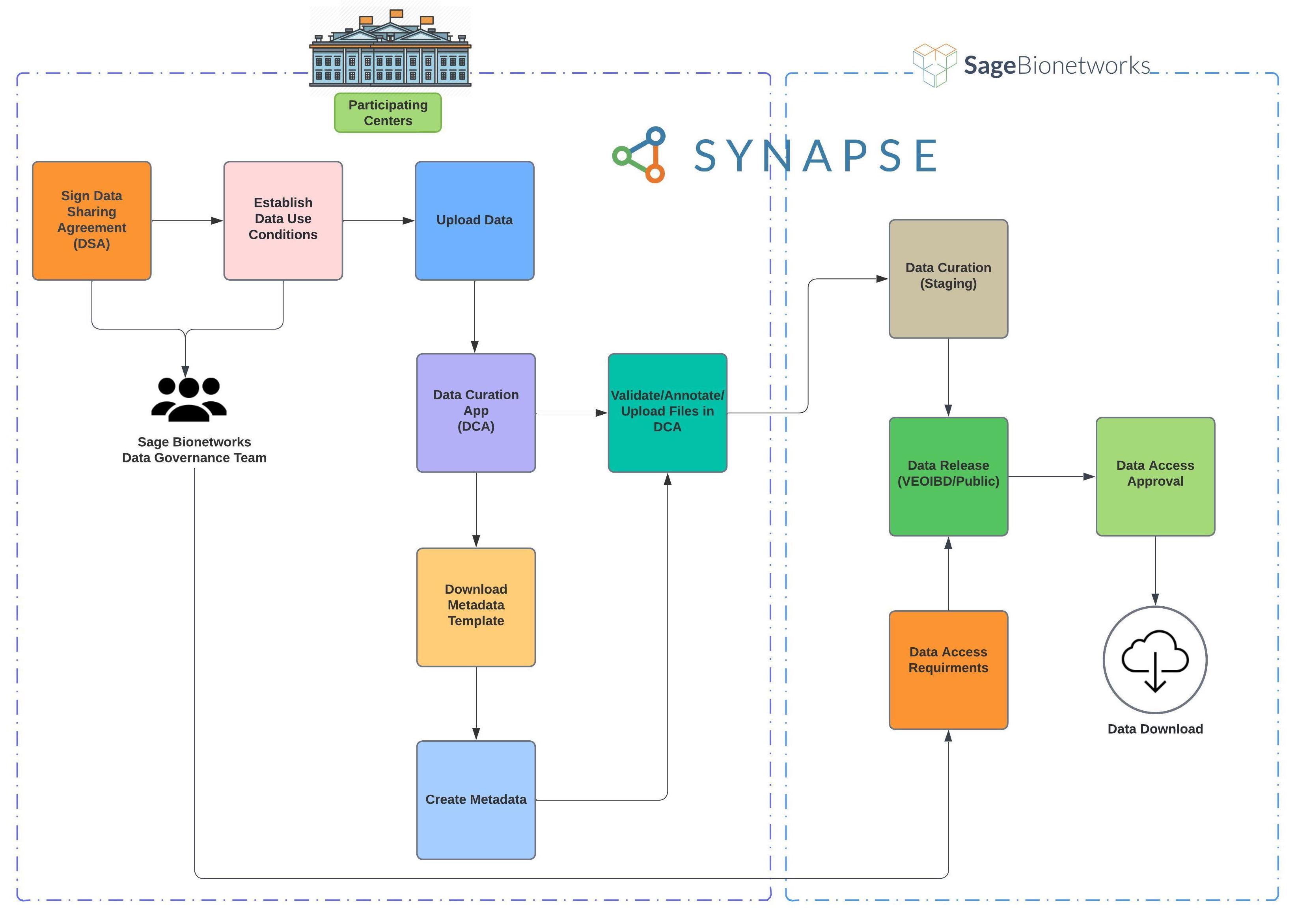
The dataset ingress process consists of six easy steps:
-
Locate the site-specific Staging folder for your team in VEOIBD Private Data Portal
-
Upload data files to the appropriate subfolder based on data privacy regulations, data type, and processing level.
-
Download the metadata templates from the Data Curator App (DCA) if you are contributing metadata files as well
-
Create metadata using our interactive metadata templates
-
Annotate data files by downloading annotation templates and submit annotated files via DCA
What do you need to get started?
Begin by browsing Synapse and accessing its most basic level of functionality. You will need to register for a Synapse account and then certify your account as an initial step. In doing so, you will be agreeing to the Synapse Code of Conduct and Synapse Terms and Conditions of Use.
In order to access site-specific workspace, PIs must notify Sage Bionetworks via the Sage Bionetworks VEOIBD Consortium Help Desk to indicate staging and data access team members.
Related articles
https://help.synapse.org/docs/About-Synapse.2058846607.html
Getting Help
If you need clarification at any point or have any questions, please submit a support request with the Sage Bionetworks VEOIBD Consortium Help Desk.